

Press Brake Backgauge Accuracy Troubleshooting: How to Diagnose Flange Length Errors

Francis Pan

Francis Pan

Francis Pan is the Foreign Trade Manager of RAYMAX, with over 10 years of experience in sheet metal fabrication equipment and CNC machinery. He has worked closely with manufacturers worldwide on press brakes, fiber laser cutting machines, fiber laser welding machines, and practical production-oriented metal processing solutions.

Top Guidelines

Table Of Contents

Stay in the the loop

Subscribe To Our Newsletter

Opening summary: Identify the error type first — don’t change the program first!

Backgauge accuracy problems usually show up as unstable flange length after bending, inconsistent left and right dimensions, dimensional drift during batch production under the same program, or cumulative error that grows larger after multiple bending steps. To troubleshoot backgauge accuracy problems, do not change the program first. Identify the error type first.

The correct sequence of troubleshooting is:

identify the type of error → verify the CNC displayed position against the actual position → check the mechanical transmission and backgauge finger parallelism → check the CNC parameters and servo feedback → check whether it is a problem of operation and workpiece datum → trial bend to confirm.

This article explains how to identify error types, follow a proper calibration process, and use preventive maintenance to diagnose flange length errors more quickly.

30 second quick check

Shop-floor symptom

Primary suspect

First check

Fixed oversize or undersize for each piece

Backgauge zero point error, X-axis offset parameter error, program datum error

Measure the actual distance from the backgauge finger contact face to the die centerline with a measuring tool and compare it with the CNC display.

Random fluctuations in size for the same program

Ballscrew backlash, guide rail contamination, loose coupling, unstable servo feedback.

Continuous back and forth positioning and record the data of each measurement.

Left and right flange lengths are inconsistent

Backgauge finger misalignment, beam misalignment, workpiece resting on only one backgauge finger.

Measure the distance from the contact face of the left and right backgauge fingers to the V-die centerline to see if the left and right positioning datums are the same.

Normal in the center station, but deterioration in the two side stations

Beam misalignment, localized guide rail wear, abnormal backgauge finger position

Do the left, center and right full-stroke positioning test.

The size starts to drift after changing materials

Material thickness fluctuation, springback variation, quality variation of cutting edge

Check the quality of material lot and edge first, don’t move the backgauge first.

Cumulative out-of-tolerance error after several bending passes

Wrong bending sequence, wrong positioning datum, abnormal backgauge finger position, unstable workpiece positioning against the backgauge.

Check whether the positioning datum of workpiece positioning against the backgauge is consistent at each step of the process.

The backgauge moves with a strange noise or jamming

Contamination of the guide rail, insufficient lubrication, ballscrew wear

Clean and lubricate the guide rail, and run the machine without load to check whether there is any resistance.

CNC display is correct but the actual position deviates

Backgauge zero point error, axis parameter error, encoder feedback abnormality

Measure the actual position of the backgauge finger with a measuring tool, check the parameters and alarm records.

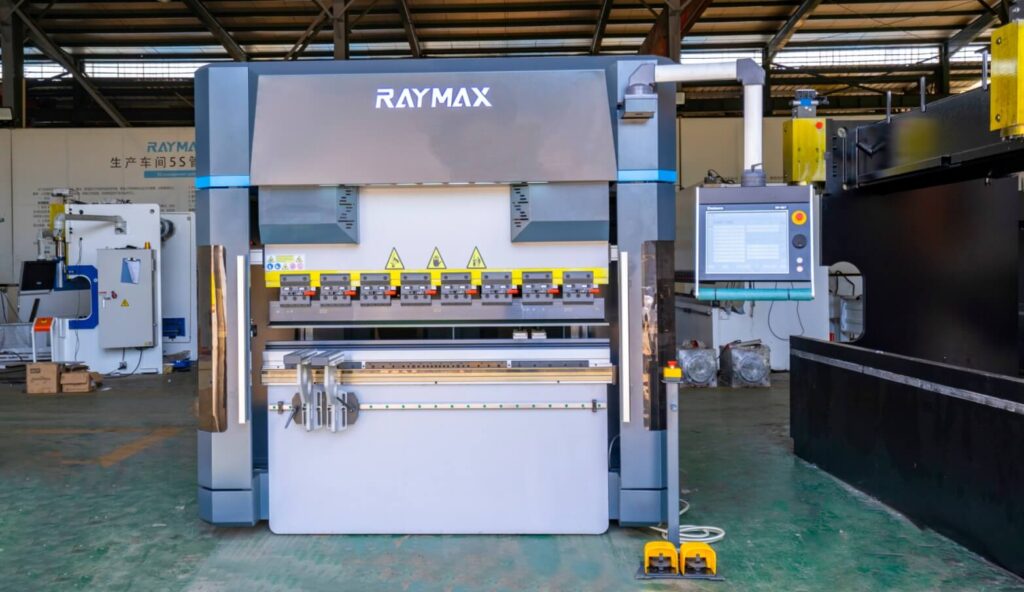
The Backgauge Is More Than a Positioning Device — It Directly Affects Flange Length

Why does the backgauge have a direct influence on the flange length?

The backgauge is the dimensional reference before bending. It controls the distance between the workpiece edge and the bending line, so it directly affects the final flange length — and it is the first link in the dimensional positioning chain to be checked. Once the backgauge position is wrong, the bend line may be offset from the beginning, and even if the angle is accurate, the final flange edge may still have a large error.

For electrical cabinets, chassis, brackets, doors, panels, and box-shaped workpieces, the flange length error in the assembly will easily expose a lot of problems, such as holes cannot be aligned, edges and edges are not aligned with each other, welding difficulties, etc., and even the entire batch of workpieces need to be reworked or scrapped directly.

Why is the size of the workpiece still wrong when the CNC display is correct?

The CNC display value being correct only means the control system believes the target position has been reached — it does not mean the backgauge finger contact face, the die centerline, and the workpiece reference edge are all truly aligned.

In the process from CNC command to finished bend, the final size of the workpiece will be affected by a number of links, including: backgauge zero point, the status of the ballscrew and guide rails, backgauge finger contact face condition, beam parallelism, die centerline, the quality of the edge of the sheet, workpiece positioning against the backgauge action and the positioning datum after multiple bending steps. Mechanical clearance, loose backgauge fingers, beam misalignment, incorrect tooling data, and the workpiece seating action can all turn a “correct display” into a “wrong part size.”

Therefore, to ensure correct workpiece size, do not rely on the CNC display value alone — always measure the actual position with a measuring tool, and then conduct a trial bend to verify.

Check the dimensional datum chain first, not just the backgauge value

Flange length cannot be determined by looking at a single number on the CNC screen. It is controlled by a complete datum chain: drawing dimension → cut edge of the sheet → backgauge finger contact face → actual X-axis position → bending line → inside bend radius. If there is any error in any of these steps, the final flange size will not match the drawing.

Therefore, when we are troubleshooting backgauge problems, we need to check each link step by step to see which one is wrong.

Which workpieces are most likely to expose backgauge accuracy problems?

Workpieces that are likely to expose backgauge accuracy problems include:

  • Longer workpieces and wider panels: Longer workpieces may magnify problems with left and right backgauge finger misalignment, beam misalignment, and poorly straightened edges of the workpiece.
  • Electrical cabinet shells and multiple-bend box-shaped parts: the more bending steps there are, the more errors can accumulate, which leads to assembly problems on the shop floor.
  • Bent parts with holes: poor backgauge accuracy can directly cause hole-position deviation.
  • Left-right symmetry of parts with high requirements: left and right backgauge fingers are not parallel, which may lead to inconsistencies in the flange length on both sides of the workpiece.
  • Batch parts with tight tolerance of flange length: poor backgauge accuracy may result in unqualified batch of workpieces with extremely tight tolerance of flange length.

The longer the workpiece and the more bending processes, the more obvious the backgauge accuracy problem will usually be exposed.

Identify the Error Type Before Changing Parameters

Fixed deviation — each piece is off by the same amount

  • Typical symptom: the actual flange length is not consistent with the flange length set in the program, but the direction and amount of deviation are basically stable.
  • Priority suspect: backgauge zero point error, X-axis offset parameter error, program datum error, bending line data error, tool library data has not been updated, backgauge finger contact face wear, the beam overall offset.
  • Troubleshooting logic: first measure the current actual position of the backgauge, compared with the CNC display value, to see if the difference is fixed. If the difference is fixed and stable, then go to check the datum and calibration value, do not change the program manually to compensate for one piece.

Random drift — the same program gives a different result each time

  • Typical symptom: the same program, the same material, the same workpiece positioning against the backgauge, the size of each workpiece is different, there is no stable pattern.
  • Priority suspect: ballscrew backlash, guide rail contamination or wear, coupling loose, backgauge finger loose, servo feedback is not stable, whether the workpiece is fully seated against the backgauge.
  • Troubleshooting logic:
    To distinguish the type of size drift.
    If the error grows gradually over long-term use, give priority to checking the ballscrew, guide rails, slider blocks, and backgauge fingers for wear;
    If the error grows gradually within the same shift, check whether iron filings are accumulating on the guide rail and ballscrew surfaces, whether lubrication is insufficient, whether the backgauge fingers are loose, and whether workpiece positioning against the backgauge is stable;
    If the error occurs suddenly after a collision, zero return or tool change, then priority should be given to checking for collision damage, zero point position, tool data and axis parameters.

Unequal length of left and right flanges

  • Typical symptom: the left end and right end of the same folded edge have different dimensions, the whole workpiece has a beveled edge, or cannot be aligned during assembly.
  • Priority suspect: the left and right backgauge fingers are not parallel, the backgauge beam is not parallel to the bending line, a backgauge finger is bent, the edge of the workpiece is not straight, and the workpiece only rests on one backgauge finger.
  • Troubleshooting logic: : Do not solve this by changing the program only. The program provides one numerical position, but the workpiece may contact the backgauge at more than one point. The correct approach is to adjust the parallelism of the left and right backgauge fingers.
Backgauge finger
Backgauge finger

Dimensions deteriorate after moving to a different station

  • Typical symptom: when bending in the middle of the machine, the size is normal, and the size deviation occurs after moving to the left or right station.
  • Priority suspect: beam is not straight, the left and right guide rail local wear, backgauge finger position is not locked, segmented tooling height is different, different stations of the die centerline is not consistent.
  • Troubleshooting logic: in the left, center, right multiple positions to do positioning tests, in order to see the full stroke accuracy is not a problem. Only one point is accurate, does not mean that the entire backgauge system is accurate.

Cumulative out-of-tolerance error after multiple bending steps

  • Typical symptom: the first bending size qualified, the second began to appear small deviations, the third and fourth after the overall deviation of the size of the obvious, and ultimately the final assembly of the holes cannot be aligned, the box does not fit together and other issues.
  • Priority suspect: bending sequence error, the positioning datum is inconsistent between bending steps, the subsequent bending does not stabilize workpiece positioning against the backgauge, backgauge finger colliding with an already-bent edge, the previous process springback and the angle of the error is transmitted to the next process.
  • Troubleshooting logic: When making multiple bends, give preference to edges for workpiece positioning against the backgauge that are stable, repeatable, and related to the assembly dimensions.

Explanation: Positioning accuracy vs positioning repeatability vs backlash

Concepts

Field meaning

Typical performance

Positioning accuracy

Whether the actual position is the same as the set position

Each flange length is fixedly larger or smaller.

Positioning repeatability

Can the backgauge return to the same point after several round trips?

Random fluctuations in size with the same program

Backlash

Approach the same point from the front and rear directions, whether the result is the same.

Inconsistent dimensions after direction change

Parallelism

Is the distance from the left and right backgauge fingers to the die centerline the same?

Inconsistency between left and right flange lengths

Do these 4 basic tests first, don’t skip a step!

If only an edge of the lower die can be used as the measuring reference, the fixed offset from that edge to the V-die centerline must be confirmed first, otherwise the measured value cannot directly represent the real X-axis positioning distance.

Test 1: Comparison between CNC display value and actual position

  • Operation method: Let the backgauge move to the specified position, use digital calipers, a depth gauge, a dial indicator, or other measuring tools to measure the actual distance from the backgauge finger contact face to the die centerline, record the measurement results and compare them with the CNC display of the backgauge positional values, and calculate the difference between them.
  • Judgment method:
    If the difference is the same every time, give priority to checking the zero point of backgauge, axis offset parameters, and program datum setup;
    if the difference is different every time, give priority to checking backgauge positioning repeatability and the mechanical transmission structure of the ballscrew, guide rails, coupling, etc.;
    if the error follows the X-axis travel to become bigger gradually, give priority to checking the screw pitch parameters, electronic gear ratio setup, scale factor and axial calibration data.

This test is the starting point of all the troubleshooting, if the parameters are adjusted directly without first conducting actual measurement, the adjusted parameters will be meaningless.

Test 2: Repeat positioning test

  • Operation method: Let the backgauge go back and forth from different directions for many times, return to the same set position, and record the actual position each time.
  • Judgment method:
    If the deviation direction and size are the same every time, prioritize the adjustment of parameters and calibration values;
    if the deviation is random, prioritize the check of ballscrew, guide rails, coupling, servo feedback;
    if the deviation is significantly different after changing direction, prioritize the check of backlash.

Poor positioning repeatability of the backgauge indicates that its mechanical chain or feedback chain has been unstable, in this case there is no way to solve the problem just by one calibration, it is necessary to carefully check the wear and looseness of the mechanical parts and the accuracy of the servo feedback, and repair or adjust it.

Test 3: Left and right backgauge finger parallelism test

  • Operation method: move the backgauge fingers to the usual working position, use digital calipers to measure the distance from the left and right backgauge fingers to the die centerline and record it, compare the difference between them. If necessary, you can also use a dial indicator to measure the parallelism of the beam.
  • Judgment method:
    If the left and right distances are different, give priority to checking whether the backgauge fingers or beam are parallel;
    if there is only a certain side of the anomaly, give priority to checking whether that backgauge finger is loose, deformed or has been hit;
    if the long workpiece is more pronounced than the deviation of the short workpieces, it may be the beam misalignment or datum error problem amplified by the long workpiece.

Some small deviations may not be visible on the short workpiece, but will be magnified on the entire bend line of the long workpiece.

Test 4: Actual trial bend verification

  • Operation method: Select stable materials, use the same set of tooling, the same program, the same kind of workpiece positioning against the backgauge way, after 3-5 pieces of continuous bending, measure their flange length, left and right dimensions and angles, and then compare the trial bend results with the results of the unloaded measurements.
  • Judgment method:
    If the no-load measurement position is accurate, but the trial bend size is still not accurate, this indicates that the X-axis static position alone is not the first suspect. The next step should focus on checking how the workpiece seats against the backgauge, the quality of the material edges, the die centerline, the R-axis height, the Z-axis backgauge finger position and the bending sequence.
    If the results of the no-load measurement and the trial bend are not accurate, the priority is to return to the backgauge itself and check the X-axis position, the condition of the backgauge fingers, the parallelism of the beam, the drive structure and the axis parameters.
    If the angle is accurate but the dimension is deviated, focus on checking the backgauge position and positioning datum; if the angle and dimension are abnormal at the same time, check the tooling data, material thickness, bending parameters and springback control at the same time.

The purpose of no-load measurement is to confirm whether the position of the machine is accurate, and the purpose of trial bend verification is to check whether the actual processing results meet the requirements. When both checks are qualified, it is considered to have completed a comprehensive inspection and confirmation of the backgauge problem.

Mechanical layer checking — start from here, do not skip layers!

Ballscrew Backlash

  • Typical symptom: inconsistent positioning after changing direction; in the repeated positioning test, back and forth to the same position is always back to inaccurate; backgauge moving with abnormal sound; the longer the use of time, the more obvious size drift; size error and movement direction.
  • Check focus: check the ballscrew backlash, whether the ballscrew nut is worn, whether the support end is loose, whether lubrication is sufficient, whether there is iron filings and dust buildup, as well as whether the dial indicator shows a pause before following the command normally when the direction changes.
  • Corrective action:
    if it is a minor problem can be cleaned, lubricated, adjusted;
    if there is a consistent direction-change positioning error, backlash compensation can be applied in the control system; if the compensation is still unstable, it is necessary to adjust or replace the relevant transmission components.
    If the parts are very seriously worn, the ballscrew assembly must be replaced.

Compensation cannot solve the mechanical problem fundamentally. If the compensation value is increasing, it means that the ballscrew backlash is continuously expanding, and at this time, we should prioritize checking, repairing or replacing the mechanical structure instead of relying solely on the compensation function.

Linear Guide Rails and Slider Blocks

  • Typical symptom: backgauge jamming when moving, unstable size of certain travel segments, uneven sound when running empty, and slight loosening when manually pushing the pallet.
  • Check focus: check the guide rail surface for iron filings, dust, or sludge; check whether the slider blocks are loose; whether lubrication is sufficient; whether the movement resistance is consistent between the two ends and the middle of the guide rail; whether there is any localized guide rail wear.
  • Corrective action: first clean the surface of the guide rail, re-lubricate, and then run an empty test. If there is still looseness or jamming after cleaning and lubricating, then check the slider block preload and the wear condition of the guide rails.

The backgauge is a precision motion system, if the guide rail surface is dirty or worn, then the backgauge positioning may not be able to ensure long-term stability.

Ball screw and guide rail

Loose coupling and motor installation

  • Typical symptom: servo motor runs normally, but the actual size is not stable; in acceleration, deceleration or direction change, the size drift is obvious; size deviation is random, no fixed rules; the backgauge cannot return accurately to the same position after repeated movements.
  • Check focus: Check whether the motor fixing bolts, coupling locking screws, ballscrew end support and synchronous drive components are tightened.
  • Corrective action: first clean the surface of the guide rail, re-lubricate, and then run an empty test. If there is still looseness or jamming after cleaning and lubricating, then check the slider block preload and the wear condition of the guide rails.

The fact that the servo motor is running does not mean that the ballscrew is also moving accurately. Any looseness in any part of the transmission chain may cause errors in the dimensions of the workpiece.

Loose, Worn, or Deformed Backgauge Fingers

  • Typical symptom: workpiece positioning point is not stable, the size of the workpiece left and right is not consistent, only part of the workpiece there is a significant deviation, a collision after the size of the sudden abnormalities, as well as the same program, different operators of different bending results.
  • Check focus: check whether the backgauge fingers have been bent out of shape, whether the backgauge finger contact face is worn, whether the locking screws are loose, whether the left and right backgauge finger heights are the same, and whether the two backgauge finger contact faces are on the same datum line.
  • Corrective action: first clean the backgauge finger contact face and re-lock, then check and adjust the parallelism of the backgauge fingers. If the contact face is seriously worn, replace the backgauge fingers in time. If a collision occurs, the backgauge finger positions must be recalibrated.

The backgauge fingers are the reference for workpiece positioning, and their position and condition directly affect dimensional accuracy. If the backgauge fingers are bent, worn, or not at the same height, there is no guarantee that the backgauge positioning will be accurate, even if the backgauge system is accurate.

Backgauge Beam Misalignment or Deformation

  • Typical symptom: Measured in the left, center and right positions, the distance from the X axis to the lower die changes regularly; the size deviation of the long workpieces is obvious, while that of the short workpieces is not obvious; the left and right dimensions are inconsistent all of a sudden after a backgauge collision.
  • Check focus: Measure the actual distance from the backgauge finger contact face to the die centerline with a measuring tool in the left, middle and right positions and record it, compare the values in different positions; check whether the beam is parallel to the bending line; check whether the beam is deformed due to impact or long-term stress.
  • Corrective action: If it is a slight deviation, the parallelism of the beam needs to be readjusted; if the beam is seriously deformed, it needs to be replaced with a new beam. The full stroke accuracy must also be re-verified after a collision.

If the beam is not parallel, even if the program is accurate, the set datum is most likely wrong.

CNC and Electrical Troubleshooting — Check This Layer Only After the Mechanical System Is Stable

Zero or reference point error

  • Typical symptom: after the backgauge returns to zero, the size of the workpiece shows a fixed deviation; power failure and restart after the first batch of size abnormalities; machine collision or maintenance, the backgauge position offset; after a return to zero, the size of the sudden offset.
  • Check focus: Check whether the backgauge return-to-zero action is normal, whether the home switch or sensor is contaminated, whether the sensor is loose, whether the actual position of the X-axis is stable after homing, and whether the zero point in the system matches the mechanical zero point.
  • Corrective action: clean the sensor sensing surface, fix the sensor, continuously perform multiple homing operations and measure the actual position of the X axis. If the size still deviates after cleaning, check the wiring and control parameters of the sensor again.

The zero point of backgauge is the starting point of all machining positions, Once the zero point is wrong, all subsequent position data may be offset.

Axis offset or scale factor error

  • Typical symptom: there is a fixed deviation in every position; the longer the stroke, the greater the error; after replacing the controller, driver, ballscrew, servo motor, the size starts to show a problem.
  • Check focus: axis offset value, screw pitch parameter, electronic gear ratio, scale factor setting, pitch compensation data, tooling library and tooling data.
  • Corrective action: This type of problem is usually not solved by changing individual workpiece programs, but by going back to the axis parameter level.

Abnormal encoder or servo feedback

  • Typical symptom: the backgauge will continue to oscillate slightly after reaching the target position, there is no way to stabilize the stop; a few workpieces suddenly appeared very large deviation, and then returned to normal; CNC system axis deviation or following error alarm; cold and hot state performance is different.
  • Check focus: check the servo alarm record, whether encoder cable is subject to electromagnetic interference, whether the encoder connector is loose or oxidized, whether servo drive parameters have been altered, whether mechanical clearance and load status are abnormal.
  • Corrective action: If the backgauge positioning continues to oscillate, priority should be given to checking the servo parameters, mechanical clearance and load status; if unidirectional drift occurs, you should focus on checking the encoder feedback, cable shielding, and connector looseness.

Program data and tooling data error

  • Typical symptom: the dimension suddenly becomes incorrect after a tooling change or program change; angle and dimension are abnormal at the same time; the same machine produces inconsistent results between different operators.
  • Check focus: Check the height of the lower die, V-die opening, the input material thickness, die centerline, tooling library data, backgauge position, human input is correct.
  • Corrective action: check whether the data entered into the program is correct; after tooling change, update the tooling library data in a timely manner.

Once the tooling data is wrong, the backgauge position calculated by CNC may be wrong. After tooling change, if you do not update the tooling library in time, you are using the old datum to process new workpieces.

Operation and workpiece layer checking — not all out-of-tolerance errors are caused by the backgauge

The Sheet Is Not Fully Seated Against the Backgauge Fingers

  • Typical symptom: the machine itself has normal accuracy, but the batch parts still have small random variations; thin plate, large plate, long plate size deviation is more obvious; the size changes after changing an operator.
  • Reason analysis:
    When positioning thin sheets against the backgauge, the middle section tends to sag, so the actual positioning contact is only at the two ends, not along the full edge.
    The operator pushes the workpiece not vertically to the backgauge fingers, but obliquely, resulting in only one corner of the edge of the workpiece contacting the backgauge fingers.
    The backgauge finger height is too low, the sheet cannot be stopped after inserting into the tooling; or the backgauge finger height is too high, the sheet is lifted up by the backgauge fingers when inserting into the tooling, and detached from the surface of the lower die.
  • Corrective action: use the front support arms to support the long plate; enable the R-axis to adjust the backgauge fingers to the appropriate height; standardize the workpiece seating action among operators.
Workpiece against the backgauge finger

The Workpiece Tail Hits the Backgauge Fingers During Bending

  • Typical symptom: the first bent part size qualified, the next few processes began to appear size drift; deep box parts, flanged parts, workpieces with a longer flange are more likely to have this kind of problem; the tail of the workpiece collides with the backgauge fingers during bending.
  • Reason analysis: no backgauge retract movement has been set.
  • Corrective action: Re-check whether the bending sequence is reasonable, confirm that the tail of the workpiece will not hit the backgauge fingers during subsequent bends; set a backgauge retract movement in the program — X-axis retract is the main action in most cases. If needed, combine with R-axis height adjustment and Z-axis backgauge finger repositioning to prevent the workpiece from hitting the backgauge fingers during bending.

Burrs and Poor Cut Edges Cause False Positioning

  • Typical symptom: the workpiece seems to be against the backgauge fingers, but the actual size is not stable; thick plate, plasma cut parts, flame cut parts are more likely to have this kind of problem; flange length of the same batch of workpieces appear similar deviation.
  • Reason analysis: plasma cutting, flame cutting of thick plates, the edge will usually have obvious burrs. When the workpiece is pushed to the backgauge fingers, it seems to have been seated, but in fact the backgauge fingers are contacting the burr tips or an irregular cut surface.
  • Corrective action: Remove burrs from the edge of the workpiece before bending to ensure that the edge quality of the cut edge meets the positioning requirements. Specify which edge is to be used as the bending positioning datum, and do not use unstable edges for the positioning of critical dimensions.
Burrs on the cut edge of the workpiece

Wrong datum selection for multiple bending steps

  • Typical symptom: single-pass size qualified, the size after multiple bending steps gets worse and worse; holes cannot be aligned, the box cannot be closed.
  • Reason analysis: the positioning datum for each process is wrong, the error will increase with the process, resulting in the final size of the finished product is unqualified.
  • Corrective action: Check the bending sequence, clarify the positioning datum for each process, and if necessary set a backgauge retract movement, including X-axis retract, R-axis height adjustment, and Z-axis backgauge finger avoidance to prevent the already-bent edge from hitting the backgauge fingers.

How to check X-axis, R-axis and Z-axis respectively?

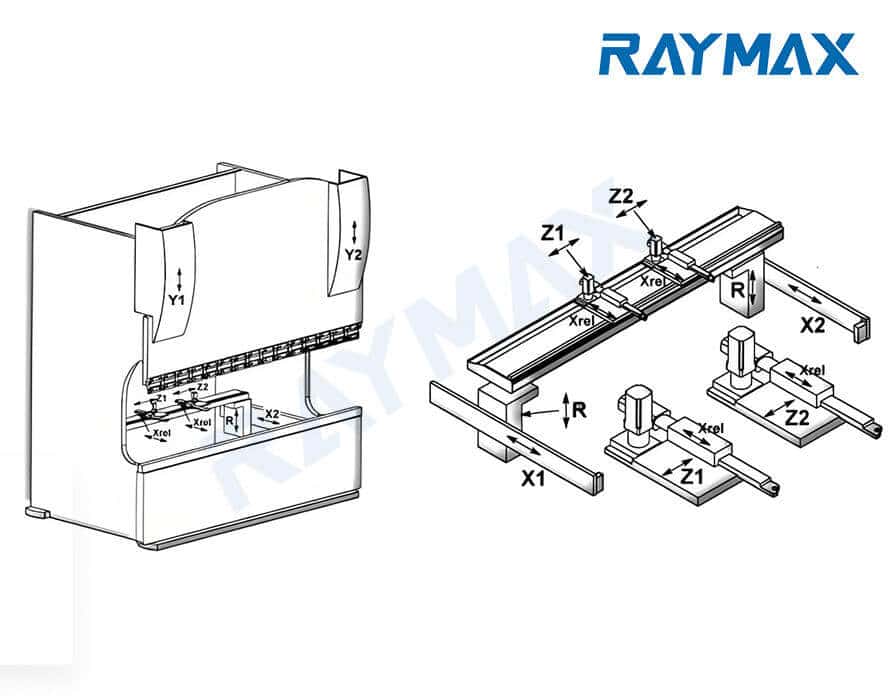
X-axis — directly determines the flange length.

  • Role: Control the front and rear position of the backgauge, which directly determines the distance from the edge of the workpiece to the die centerline, i.e. the flange length.
  • Typical problems: Fixed deviation or random drift in flange length; different stopping positions after moving from different directions; the longer the continuous running time, the more obvious the deviation.
  • Troubleshooting focus: Compare the measured position of the X axis with the displayed value in the CNC to see if there is a regular deviation; do a repeat positioning test to observe whether the deviation is fixed or random; check the status of the ballscrew, guide rails, coupling and servo feedback.

If it is a simple part, you usually only need to pay attention to the X-axis. If it is a complex part, you must pay attention to the X-axis, R-axis and Z-axis at the same time.

R-axis — affects the backgauge finger height and the stability of multi-pass bending

  • Role: Controls the height of the backgauge fingers to determine if the workpiece can be stabilized against the backgauge fingers at the correct height.
  • Typical problems: the workpiece is unstable when pushed against the backgauge fingers; collision between the already-bent edge and the backgauge fingers; unstable size of the subsequent bending of the deep box parts; replacement of tooling with different heights causes sudden dimensional anomalies.
  • Troubleshooting focus: check whether the current backgauge finger height is suitable for the current tooling height; check whether an R-axis retract has been set in the multiple-bend program; check whether the left and right backgauge finger heights are the same.

R-axis is very important in the processing of complex parts. Once the backgauge finger height is wrong, the workpiece positioning datum may change.

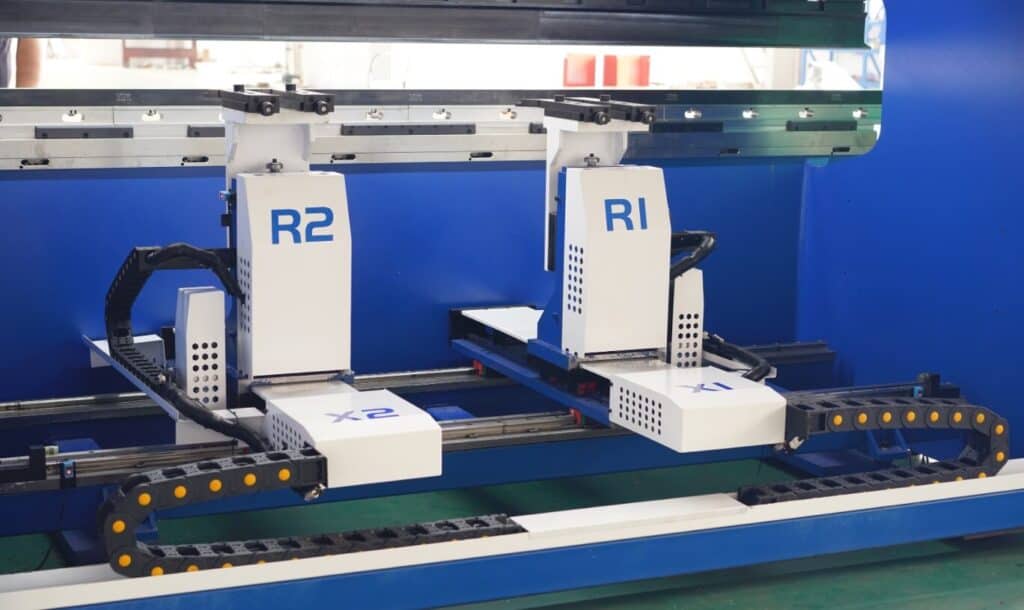
Z-axis — affects left/right positioning and workpiece positioning against the backgauge for complex parts

  • Role: To control the left and right position of the backgauge fingers and to determine whether the backgauge fingers can avoid the holes, notches and shaped edges on the workpiece.
  • Typical problems: The workpiece leans at an angle, the workpiece contacts only one backgauge finger, the left and right dimensions are inconsistent, and the positioning of narrow/small/irregular parts is unstable.
  • Troubleshooting focus: Check whether the Z-axis position is locked, whether the spacing between the left and right backgauge fingers is suitable for the width of the workpiece, and whether the backgauge fingers can avoid all the holes and notches.

The Z-axis determines whether the backgauge fingers are in the correct position. Once the backgauge finger position is wrong, the workpiece may lean against the backgauge or contact only one backgauge finger.

What is the value of a multi-axis backgauge?

The value of a multi-axis backgauge is not so much that the more axes you have, the more accurate it is, but rather that it allows for more flexible positioning of complex workpieces, provided that the machine structure, control system, calibration process, and operating habits are all stable.

For deep box parts, shaped parts, multiple-bend parts, and left-right asymmetric parts, multi-axis backgauge can reduce manual positioning errors and increase the degree of freedom of positioning.

Backgauge X/R/Z axis function diagram

Standard procedure for backgauge calibration

Before cleaning, measuring, adjusting the backgauge fingers, checking the guide rails or ballscrew, it is necessary to stop the machine and cut off the power supply or control the related moving parts according to the equipment maintenance regulations.

Particular attention should be paid to the fact that you cannot reach into the work area for measuring or cleaning operations while the ram, tooling and backgauge are in motion.

Step 1: Stop the machine, clean, and check for impact marks

Before calibration, clean the guide rails, ballscrew, backgauge finger contact face, and sensor sensing surface, and check whether the backgauge fingers have been deformed by a collision, whether bolts are loose, whether the beam is deformed, whether the sensor mounting is loose, and whether the guide rails and ballscrew show visible contamination.

If these basic conditions are not met, the accuracy of the backgauge cannot be guaranteed.

Step 2: Confirm mechanical parallelism

Measure the parallelism between the backgauge beam and the bending line, and confirm the distance from the left and right backgauge finger contact faces to the die centerline, covering at least the left, middle and right positions.

In the horizontal direction, make sure that the backgauge beam is parallel to the bending line; in the vertical direction, check whether the heights of the left and right backgauge fingers are the same, and confirm whether the R-axis height matches the currently used tooling and workpiece.

It is not enough to measure only one direction or one work station, which can only prove the status of a certain part, and there is no way to guarantee that the positioning accuracy of the whole backgauge system is accurate.

Step 3: Calibrate the actual X-axis position

First set the standard position, then measure the actual position, compare the displayed value with the measured value, then adjust the axis offset or calibration value, and finally repeat the verification.

If it is a high-demand scenario, at least measure multiple positions of the near end, middle section and far end. Be careful not to correct too much at one time, and re-measure and trial bend after each adjustment.

Step 4: Confirm the R-axis height and Z-axis backgauge finger position

Firstly, check whether the R-axis height is suitable for the current tooling, and also check whether the heights of the left and right backgauge fingers are the same;

secondly, adjust the Z-axis backgauge finger position to make sure that it can avoid the holes, notches and shaped edges on the workpiece.

In the case of multi-pass bending, it is also necessary to confirm whether it is necessary to set a backgauge retract movement, including X-axis retract, R-axis height adjustment and Z-axis backgauge finger avoidance. Only when the R-axis and Z-axis parameters are set accurately, the workpiece can be stably seated at the correct position.

Step 5: Trial bend verification and build a calibration record

After calibration is completed, trial bend verification must be done to record the flange length, left and right dimensions, bend angle and total dimensions after multiple bends, and to confirm that there will be no interference in the assembly.

In the calibration record, note down: date, operator, machine number, tooling number, material information, set values, measured values, adjusted values and final trial bend results.

Documenting the complete calibration results is the only way to see if there is a gradual decline in accuracy or a sudden jump.

Printable Test Record Sheet

Test items

Setpoint

Actual measurement

Deviation

Error type judgment

Processing action

X axis fixed position test

Fixed deviation/random drift

Repeat Positioning Test

Positioning repeatability is stable or not

Left backgauge finger distance

Consistency between left and right

Right backgauge finger distance

Consistency between left and right

R axis height

Consistent height

Z-axis backgauge finger position

Suitability for workpieces

Trial bend flange length left side

Verification of actual processing

Trial bend flange length right side

Verification of actual processing

Preventive maintenance rhythm – stabilizing accuracy over time

Maintenance rhythm table

Frequency

Required action

Before each shift

Clean the backgauge finger contact faces and guide rails, check the bolt fastening status, and observe whether the backgauge moves smoothly.

Weekly

Check the lubrication status, and make a record of positioning repeatability spot checks.

Monthly

Check the X-axis datum and the parallelism of the left and right backgauge fingers at the usual working positions.

After a collision

Stop the machine to check the actual position of the backgauge fingers, beam and X-axis and make a trial bend. Do not go straight into batch production.

After replacing critical parts

Re-calibrate the relevant axis parameters and do a trial bend to verify.

After batch part size starts to drift

First distinguish what type of error, then follow the sequence of mechanical, parameter, electrical and operation to check.

Key judgment

If accuracy gradually declines, mechanical component wear is the first suspect. If accuracy shifts suddenly, first check whether a collision has deformed the backgauge fingers, shifted the backgauge zero point, or changed the axis parameters.

How does the backgauge configuration affect long-term accuracy? What to ask when selecting a machine

Don’t just look at the number of axes — look at the overall capability of the backgauge system

When purchasing a press brake, you can’t just focus on how many axes the backgauge has, but rather look at the structural rigidity of the backgauge, the stability of the servo control, the positioning repeatability detection method, the number of axes supported by the controller and synchronization function, whether the factory has a precision testing process and after-sales calibration guidance.

The most critical thing about the backgauge is its positioning repeatability, not the number of axes.

Which customers need a higher-spec backgauge?

When your main products include multiple-bend parts, box parts, electrical cabinets and enclosures, long panels, asymmetric workpieces, workpieces with holes that require high positioning requirements, workpieces with high flange length consistency requirements, and your shop needs to do frequent changeovers for batch production, then you need to consider a higher-spec backgauge system, which is able to reduce the errors caused by manual positioning when dealing with complex workpieces.

If your workpieces always have unstable flange lengths, inconsistent left and right dimensions, and deteriorating accuracy after multiple bending passes, then simply adjusting the program will not solve the problem at its root, but rather, you need to reevaluate the machine’s backgauge structure, axis configuration, drivetrain, controller capability, tooling fit, and workpiece positioning method.

If you need to evaluate a backgauge configuration, don’t just ask for “how many axes”.

In order to provide an optimal configuration, it is recommended that you provide more detailed information, including: product drawings, material thickness, bend length, minimum flange size, tolerance requirements, and critical information such as the availability of box-shaped and irregular parts. Based on this information, Raymax engineers can evaluate the required X/R/Z-axis configuration, backgauge finger structure, and control system to ensure the machine can support your long-term dimensional accuracy requirements.

Ready To Upgrade Your Metal Fabrication Line? ​

Email Us For A Free Consultation.​

Frequently Asked Questions (FAQs)
The most common causes of backgauge inaccuracy are usually found in the mechanical transmission, backgauge finger condition, beam parallelism, CNC zero point, axis parameters, servo feedback and workpiece positioning against the backgauge. When we carry out accuracy fault troubleshooting, we should first distinguish the type of deviation, if it is a fixed deviation, we should give priority to checking the backgauge zero point and the program datum; if it is a random drift, it may be a problem with the stability of the ballscrew, guide rails, coupling and backgauge fingers. After confirming that the mechanical system is stable, check the parameters, electrical feedback, and operating method. Do not start by changing the program.

The CNC system showing the backgauge is in position only indicates that the target position of the system instruction has been reached, but it does not mean that the workpiece is actually seated at the correct position. The actual size of the workpiece is also affected by the backgauge finger contact face condition, the parallelism of the beam, the ballscrew backlash, the workpiece edge quality, sheet sag, the die centerline and the workpiece seating action. The correct practice is to use a measuring tool to measure the distance from the backgauge fingers to the die centerline, and conduct a trial bend to verify.

First look at the performance of the workpiece. If there is a fixed deviation in flange length, inconsistent left and right dimensions, or positioning drift under the same program, then give priority to checking the backgauge and positioning datum; if the angle deviates, the inside bend radius changes, or springback changes noticeably after switching material lots, then focus on checking the material, tooling and bending parameters.

Let the backgauge make several round trips from different directions to return to the same set position, and record the actual position each time. If the direction and amount of deviation is basically the same each time, then you should prioritize checking the calibration or datum; if the deviation is randomly varying each time, then you should focus on checking the positioning repeatability, mechanical drive chain and servo feedback stability.

Because the longer the workpiece, the more errors caused by non-parallelism of the left and right backgauge fingers, beam misalignment, poorly straightened workpiece edges, and poor workpiece seating against the backgauge accumulate along the length into the final flange. Short workpieces only contact a limited section of the reference line, which only produces a slight deviation that is not easy to be detected. Therefore, just because a short workpiece passes the test does not mean that the production of a long workpiece will be stable.

You cannot continue making high-precision batch parts after a backgauge collision. The impact can cause backgauge finger deformation, beam misalignment, a shift in the actual X-axis position, and unstable positioning repeatability, so a trial bend verification must be carried out first. Formal production can be resumed only after completing the basic checks and confirming dimensional stability.

No. The number of axes determines the positioning flexibility for complex parts — it is not equal to accuracy. The accuracy of the backgauge depends on the ballscrew, guide rails, servo control, backgauge finger structure, mechanical rigidity, calibration process and positioning repeatability. Even with more axes, accuracy will still drift if the mechanical drive chain is unstable.

Related product

Related Blog

No posts

Post Your Review

Share Your Thoughts And Feelings With Others